TOP 20 Features for Your Tesla
In today's blog post, we'll be looking at the top 20 features for the Tesla Model 3 or Model Y. Many of you are sure to pick up a helpful tip or two.
Enjoy reading and trying them out!
1. Tesla Key
There are 2 ways to open or close your Tesla.
The first option is the included black key card. The card must be held against the B-pillar, below the camera. A short time later, a confirmation tone sounds to open/close the car. To drive off, the key card must be placed on the center console (in front of the armrest) for verification.
For storing and protecting your card, we have a suitable case here .
The second way is via the Tesla App.
Through the app, the entire vehicle can be controlled via a Bluetooth signal. Functions such as activating the climate control, remotely closing/opening the vehicle, and opening the trunk & frunk are possible through the Tesla app.
The climate control extends across the entire front of the Tesla. The settings are made via the display, with two fans controlling the airflow. A vertical and horizontal fan ensure this unique airflow in the interior.

3. Share Driving Routes with Your Tesla
You can easily send routes from Google Maps from your smartphone to your Tesla. Especially when you check the route before departure, you can easily transfer the navigation from your phone to the Tesla system. To do this, click the "Share" button in Google Maps and then select Tesla. The fastest route and necessary Superchargers for charging will be automatically planned for you.
4. Aero Wheels for More Range
The Aero wheel covers serve to improve aerodynamics and the associated efficiency.
The result? More battery power and thus additional range. Approximately 10% more efficiency is possible with these wheels!
You can also remove the covers, revealing the alloy wheels underneath, which gives your Tesla a completely different look.
If you're still looking for new wheels for more range and optimized aerodynamics, here is our most popular wheel.
5. Adjust Mirrors and Steering Wheel CorrectlyThe mirrors are adjusted using the left scroll wheel on the steering wheel. First, go to Vehicle -> Mirrors -> by rotating the scroll wheel up and down and pressing left and right, you can manually adjust the mirrors. The steering wheel position can also be adjusted using the left scroll wheel.
6. Easy Reverse ParkingThe mirrors can be automatically lowered as soon as you engage reverse gear. This way, you can protect your rims and see exactly how far you are from the curb.
To activate: Vehicle -> Mirrors -> Auto-tilt mirrors
7. Precise Distance Measurement when Parking
The Tesla rearview camera precisely detects obstacles when reverse parking down to the centimeter, making parking child's play. Even front objects are displayed with centimeter accuracy. This is because it is often difficult to estimate the exact distance to obstacles with rearview cameras.
8. Inductive Charging for your Smartphone
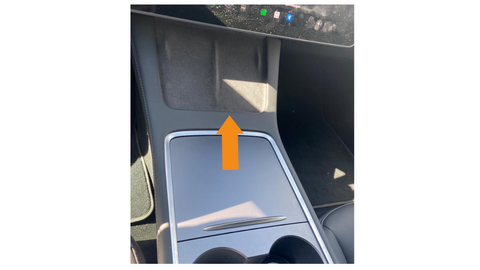
You'll find the two inductive charging pads on the center console above the storage compartment.Simply place your phone on them to charge.
By pressing the left stalk (turn signal lever), you will see adjustment options for the windshield wipers on the display, or you can turn off the windshield wipers if necessary.
Since it is very difficult to access the windshield wipers, you have to activate the "Wiper Service Mode" under the "Service" menu item. This automatically raises the windshield wipers and allows the wiper blades to be replaced.
11. Check Range or Battery LevelBy tapping on the upper display (next to the battery symbol), you can view the battery level in percent or the range in kilometers.
12. Display Average Power Consumption
To do this, you need to click on the "Consumption" menu item on the Home button. There you will get an overall overview of consumption and the approximate range.
13. Car Wash Mode
Under Vehicle -> Service, you can activate car wash mode and, if necessary, enable rolling in an automatic car wash. You will also see which functions are deactivated during the car wash (e.g., folding mirrors, lights).
At low speeds (approx. 8 km/h), you can switch between the two driving modes (Drive and Reverse) and thus maneuver the car faster.
Live traffic is displayed 1:1 on the screen. Vehicles, trams, trucks, traffic lights, and cones are shown in real-time on the display, increasing driving safety.

16. Protect Glove Compartment
Do you have valuable items in your car that you want to protect? You can even protect them with a glove compartment PIN. Under the menu item Vehicle -> Security -> Glove Compartment PIN, you can set your own PIN to protect your valuables.
Additionally, the Tesvolution Shop also offers a secret compartment for the armrest. A concealed compartment where you can hide cash, charging cards, or vehicle documents. You can find the product here.
If the sounds of the autopilot or turn signal are too loud, you can quiet them using the "Joe Mode." You can find this mode under Vehicle -> Safety -> Joe Mode.
Especially in low parking garages or carports, you want to prevent scratches on the trunk. You can easily adjust the individual height: Open the trunk, let it move to the desired position, and briefly press the trunk closing button. Once the trunk has stopped, hold the button for about 4 seconds until a beep sounds. If you have followed all steps correctly, the trunk will open to the desired height the next time you operate it.
For even more protection for the rear of your Tesla, we have protective films and a load sill protector in our shop.
19. Speed Display
The speed in Model 3 and Y is only displayed on the screen. There is no additional speedometer in the interior. This gives you an unobstructed view of the road and allows you to fully concentrate on driving.
20. Fun for All Occupants
Tesla has put special thought into how to entertain during charging or waiting times. While the Tesla is in parking mode, you can try out countless apps, one example of which is found under the Arcade menu -> Beach Buggy Racing 2. In this game, you can use the pedals for acceleration and braking as well as the steering wheel for control.
Additionally, there is also a Karaoke mode that offers many popular tracks to choose from and transforms your Tesla into a karaoke bar within seconds.